13 Jul 2026
Sarah Mitchell
The Hidden Retail Practices That Help You Save Money: Major Stores' Price Matching Secrets
Introduction
Have you ever walked into a store, purchased a television for $899, and later discovered another retailer selling the exact same model for $749?
Most shoppers assume they've lost their chance to save money.
The reality is quite different.
Many major retailers have price matching and price adjustment policies designed to keep customers from shopping elsewhere. Surprisingly, these money-saving policies are rarely promoted at checkout, leaving millions of shoppers unaware that they could save hundreds—or even thousands—of dollars each year.
Whether you're buying electronics, furniture, appliances, groceries, or home improvement supplies, understanding how price matching works can dramatically reduce your expenses.
In this guide, you'll learn the hidden retail practices smart shoppers use every day, discover which stores commonly offer price matching, and master strategies that help you pay the lowest possible price.
What Is Price Matching?
Price matching is a retailer's promise to sell an item at the same price as an eligible competitor.
Instead of losing a customer, retailers often agree to reduce their price to match another qualifying store.
Example
You find a coffee maker priced at:
RetailerPriceStore A$79Store B$64
If Store A offers price matching, they may reduce their price to $64, allowing you to purchase from your preferred retailer without paying extra.
Why Retailers Offer Price Matching
Although it seems like stores lose money, price matching actually benefits retailers.
Retailers Want To:
Keep customers from shopping elsewhere
Build long-term customer loyalty
Compete with online marketplaces
Reduce product returns
Increase impulse purchases after customers enter the store
Once customers are inside, they're likely to purchase additional items with higher profit margins.
The Retail Pricing Strategy Most Consumers Never Notice
Modern retailers use dynamic pricing.
Prices can change several times each day based on:
Competitor prices
Inventory levels
Consumer demand
Time of year
Supply chain costs
Regional competition
Online shopping trends
This explains why the same product may cost different amounts:
Online vs. in-store
Mobile app vs. website
Different store locations
Morning vs. evening promotions
Price matching helps retailers stay competitive despite these fluctuations.
Common Types of Price Matching
TypeDescriptionBest ForStandard Price MatchMatches another retailer's current advertised priceElectronics, appliancesOnline Price MatchMatches approved online competitorsOnline shoppersIn-Store MatchMatches prices at local competitorsSame-day purchasesPrice AdjustmentRefunds the difference if prices drop after purchaseLarge purchasesHoliday Price ProtectionCovers purchases during seasonal promotionsHoliday shopping
Major Retailers That Commonly Offer Price Matching
Many well-known retailers have offered some form of price matching or price adjustment, though policies vary and may change over time.
Retail CategoryExamples of RetailersCommonly Price Match?*ElectronicsBest BuyYes (policy-dependent)Home ImprovementHome Depot, Lowe'sYesOffice SuppliesStaples, Office DepotOftenDepartment StoresTargetOftenDiscount RetailWalmartLimited by policyPet SuppliesPetcoOftenCraft StoresMichaelsOften
*Note: Always review the retailer's current policy, as eligibility, competitors, and exclusions can change.
Hidden Conditions Retailers Don't Emphasize
Many shoppers hear "price matching" and assume it's automatic.
It isn't.
Here are the most common requirements.
1. The Product Must Be Identical
Retailers usually require:
Same brand
Same model number
Same color
Same accessories
Same size
Same warranty
Even one different feature may make the product ineligible.
2. The Competitor Must Be Approved
Most retailers won't match every website.
Typically accepted competitors include:
National retail chains
Official manufacturer websites
Major online retailers
Often excluded:
Marketplace sellers
Auction websites
Third-party vendors
Flash-sale sites
3. The Item Must Be In Stock
Retailers usually require the competitor to have the product available for immediate purchase.
If it's out of stock, the price match may be denied.
4. Clearance Items Usually Don't Count
Most stores exclude:
Clearance
Liquidation
Open-box items
Refurbished products
Damaged merchandise
Black Friday doorbusters
5. Membership Discounts May Be Excluded
Prices available only through:
Membership clubs
Employee discounts
Student discounts
Military pricing
may not qualify.
Price Adjustment: The Secret That Saves Money After You Buy
One of the least-known retail policies is the price adjustment.
Example
Monday:
You buy a laptop for $1,100.
Friday:
The retailer lowers the price to $950.
If the store allows price adjustments within its eligible window, you could receive a $150 refund without returning the laptop.
Many shoppers never ask—and miss out on easy savings.
The Best Time to Use Price Matching
Some periods offer better opportunities than others.
Shopping SeasonPrice Match OpportunityBlack Friday (where eligible)High competition, but many exclusionsCyber MondayExcellent online dealsBack-to-SchoolFrequent price changesMemorial DayAppliance discountsLabor DayFurniture promotionsEnd of SeasonClearance opportunitiesNew Product LaunchesOlder models often drop in price
Smart Shopping Strategies That Maximize Savings
Compare Prices Before Checkout
Use retailer websites, shopping apps, and trusted price comparison tools before paying.
Keep Every Receipt
Digital receipts make requesting price adjustments much easier.
Ask Politely
Many customer service representatives are willing to help if you already have the competitor's advertisement available.
Shop Midweek
Some retailers update prices during the middle of the week.
Checking prices before weekend shopping can reveal savings.
Monitor Prices After Purchase
Continue checking prices for several days or weeks after buying an expensive item.
A price drop could mean an easy refund.
Stack Discounts When Allowed
Depending on the retailer's rules, you may be able to combine:
Price matching
Store coupons
Cashback apps
Rewards programs
Credit card offers
Manufacturer rebates
Always confirm whether combinations are permitted.
Common Shopping Mistakes That Cost Consumers Money
MistakePotential CostNot comparing pricesPaying 10–30% moreThrowing away receiptsMissing refundsIgnoring online pricesLosing online discountsAssuming all retailers price matchMissed opportunitiesWaiting too long for adjustmentsRefund deniedBuying during peak demandHigher prices
Estimated Annual Savings
The savings from price matching depend on shopping habits. Here's an illustrative estimate:
Household TypeAverage Annual PurchasesPotential Annual Savings*College Student$2,000$75–$150Single Professional$5,000$150–$350Family of Four$12,000$400–$900Homeowner$20,000$700–$1,500
*Illustrative estimates only. Actual savings vary based on retailer policies, eligible purchases, and shopping behavior.
Who Benefits the Most?
Families
Frequent purchases across multiple categories increase opportunities to save.
Students
Limited budgets make every discount more valuable.
Homeowners
Large purchases like appliances and tools often have greater price-match potential.
Tech Enthusiasts
Electronics frequently experience rapid price changes.
Holiday Shoppers
Seasonal competition can create additional opportunities to save.
Frequently Asked Questions (FAQ)
Do all retailers offer price matching?
No. Each retailer sets its own policy, and some do not offer price matching at all.
Can I request a refund if the price drops after I buy?
Some retailers provide price adjustments within a specified time frame. Policies vary.
Can online prices be matched?
Many retailers match prices from approved online competitors, but exclusions often apply to third-party marketplace sellers.
Can I combine coupons with price matching?
It depends on the retailer's policy. Some allow stacking discounts, while others prohibit it.
Are clearance items eligible?
Usually not. Clearance, liquidation, and open-box items are commonly excluded.
Final Thoughts
Price matching is one of the most underused tools available to consumers. While retailers often promote low prices, the details of their price-matching and price-adjustment policies are less visible. By understanding how these programs work—and taking a few extra minutes to compare prices, save receipts, and ask about adjustments—you can avoid overpaying on many everyday purchases.
Whether you're buying a laptop, refrigerator, power tools, or household essentials, informed shopping habits can make a meaningful difference to your budget over the course of a year. The key isn't simply finding a sale—it's knowing when a retailer is willing to match a better price and how to take advantage of that opportunity.
11 Jul 2026
James Clear
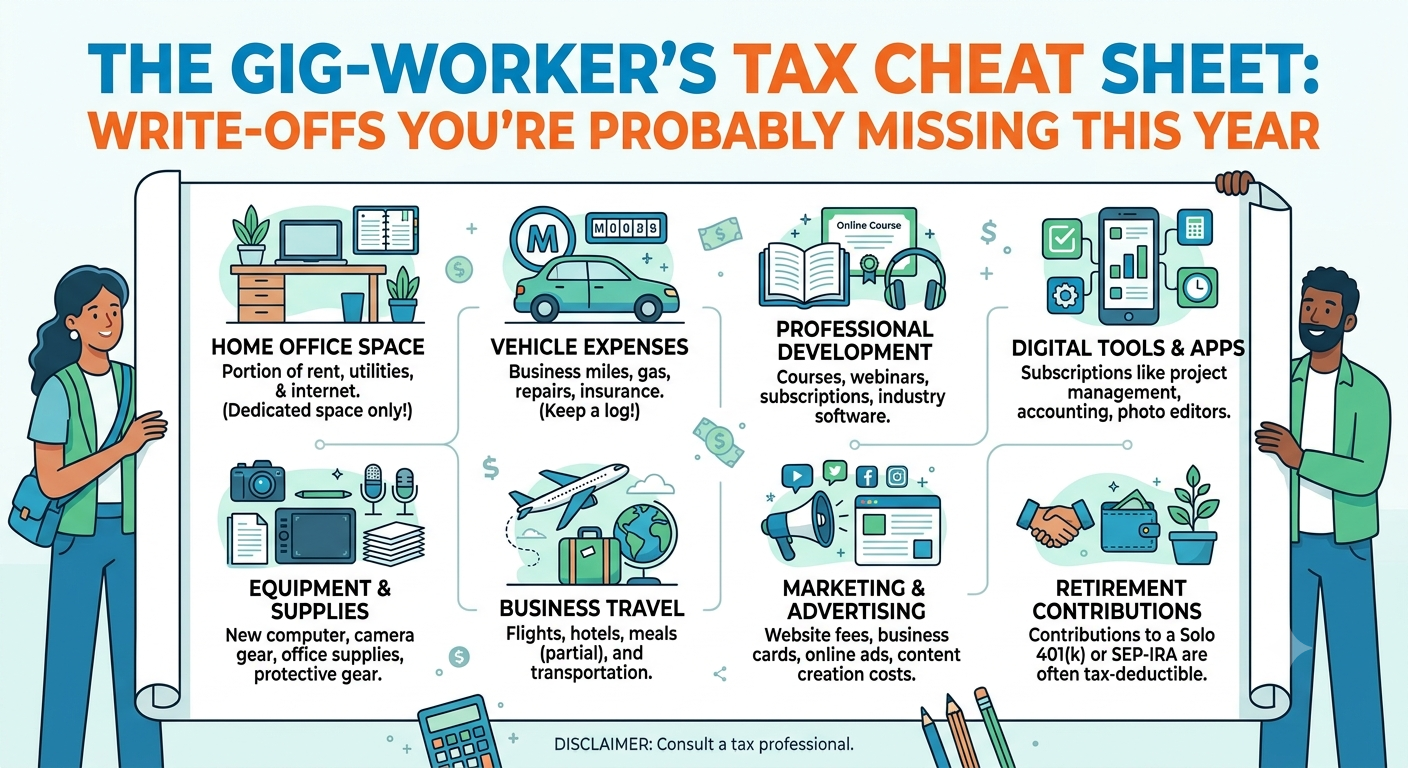
The Gig Worker’s Tax Cheat Sheet: Write-Offs You're Probably Missing This YearThe gig economy has changed how millions of people earn a living. Whether you drive for rideshare apps, deliver food, sell products online, freelance remotely, or create digital content, you're likely classified as self-employed—which means you're responsible for paying your own taxes.While this comes with additional tax obligations, it also unlocks valuable deductions that traditional employees often can't claim.Unfortunately, many gig workers leave hundreds—or even thousands—of dollars on the table every year simply because they don't know what expenses qualify.This guide breaks down the most commonly missed tax write-offs, how they work, and how to organize your finances so you can reduce your taxable income legally and confidently.Why Tax Deductions MatterUnlike employees, gig workers are generally taxed on net profit, not total earnings.FormulaTaxable Income =
Total Income − Eligible Business ExpensesExampleDescriptionAmountTotal Income$70,000Business Expenses$15,000Taxable Income$55,000Even relatively small deductions throughout the year can add up to meaningful tax savings.Common Sources of Gig IncomeGig TypeTypical Income SourcesFreelancersWriting, design, programmingDelivery DriversFood and grocery deliveryRideshare DriversPassenger transportationOnline SellersE-commerce marketplacesContent CreatorsSponsorships, ads, affiliate marketingConsultantsProfessional servicesTutorsOnline or in-person lessonsPhotographersEvents and commercial projectsEstimated Business Expense CategoriesTypical Business Expense Allocation for Gig WorkersIllustrative breakdown of common deductible expense categories.EducationHome OfficeInternet & PhoneMarketingOtherTechnologyTravelVehicleTax Write-Offs Many Gig Workers Miss1. Home Office DeductionIf you use part of your home regularly and exclusively for business, you may qualify for a home office deduction.Eligible expenses can include:Rent or mortgage interest (subject to local tax rules)UtilitiesInternetHome insuranceProperty taxes (where applicable)Repairs related to the workspaceExpensePotentially Deductible?Office Desk✅Office Chair✅Bedroom Furniture❌Kitchen Remodel❌2. Internet & Phone BillsIf you use your internet or phone for work, the business-use portion may be deductible.Examples:Client callsVideo meetingsUploading projectsBusiness emailsSocial media managementKeep records showing how you estimate the business-use percentage.3. Laptop, Monitor & EquipmentMany freelancers overlook equipment purchases.Common deductions include:LaptopDesktopMonitorKeyboardWebcamMicrophoneExternal SSDPrinterBusiness softwareTechnology Spending BreakdownEquipmentExample Business UseLaptopClient workMonitorDesign or codingWebcamMeetingsMicrophonePodcastingExternal DriveBackupsSoftwareEditing, accounting, design4. Business SoftwareMonthly subscriptions often qualify.Examples include:Accounting softwareCloud storageDesign toolsVideo editing softwareAI productivity toolsProject management platformsCRM systems5. Mileage and Vehicle ExpensesFor delivery drivers, rideshare operators, and mobile freelancers, vehicle expenses are often one of the largest deductions.Potentially deductible business travel includes:Client meetingsDeliveriesBusiness errandsTravel between job sitesKeep detailed mileage logs throughout the year.Frequently Claimed Expense CategoriesCommonly Claimed Gig Worker Tax DeductionsIllustrative comparison of deduction categories by frequency.0%25%50%75%100%VehiclePhoneInternetHome OfficeEquipmentTravelMarketingEducation6. Professional EducationContinuing education related to your current business may qualify.Examples:Online coursesIndustry certificationsWorkshopsConferencesProfessional membershipsBooks directly related to your work7. Marketing ExpensesGrowing your business often involves deductible costs such as:Website hostingDomain registrationLogo designPaid advertisingEmail marketingBusiness cardsPromotional materials8. Banking & Payment Processing FeesMany freelancers overlook small recurring charges.Examples:Payment processor feesBusiness bank account feesWire transfer feesCurrency conversion feesMerchant processing costsThese expenses can accumulate significantly over a year.9. Business TravelIf a trip is primarily for business, eligible costs may include:FlightsHotelsPublic transportationRental carsConference registrationPersonal sightseeing or vacation expenses generally aren't deductible.10. Business MealsMeals with clients or business partners may qualify under local tax rules if they are directly related to conducting business.Always retain:ReceiptsDateAttendeesBusiness purpose11. Health Insurance (Where Eligible)Self-employed individuals in some countries may be able to deduct eligible health insurance premiums, depending on tax laws and personal circumstances.12. Retirement ContributionsMany self-employed retirement plans provide tax advantages while helping you build long-term savings.Overlooked Tax DeductionsExpenseOften Forgotten?Domain renewals✅Cloud storage✅AI subscriptions✅Stock photos✅Online portfolio✅Zoom subscription✅Accounting software✅Workspace lighting✅Office décor used for business✅Business insurance✅Tax Record ChecklistMaintain organized records throughout the year.DocumentKeep?Receipts✅Invoices✅Bank Statements✅Mileage Logs✅Business Contracts✅Software Receipts✅Travel Records✅Tax Forms✅Digital storage can make retrieval much easier during tax season.Simple Expense Tracking WorkflowIncome Received
│
▼
Save Receipt
│
▼
Categorize Expense
│
▼
Record in Accounting Software
│
▼
Monthly Review
│
▼
Tax FilingCommon Tax MistakesMistakeBetter PracticeMixing business and personal expensesUse separate accountsLosing receiptsStore digital copiesWaiting until tax seasonTrack expenses monthlyForgetting subscriptionsReview recurring paymentsNot tracking mileageUse a mileage logIgnoring small expensesRecord every legitimate business costTips to Maximize Legitimate DeductionsSeparate personal and business finances.Save receipts as soon as purchases are made.Review recurring subscriptions every quarter.Track mileage consistently if you use a vehicle for work.Keep documentation that supports the business purpose of each expense.Reconcile income and expenses monthly rather than waiting until year-end.Consider consulting a qualified tax professional if your situation is complex or involves multiple income sources or countries.Final ThoughtsGig work offers flexibility and independence, but it also requires a proactive approach to taxes. By understanding which business expenses may qualify as deductions, maintaining organized records, and reviewing your finances regularly, you can reduce your taxable income while staying compliant with tax laws.Remember that tax rules vary by country—and often by state or province—so always verify eligibility based on your local regulations. A well-maintained expense log and informed tax strategy can make a significant difference in how much of your hard-earned income you keep each year.
15 Jun 2026
Allen Williams
IntroductionIn today's fast-paced world, spending hours in the kitchen is no longer practical. Whether you're a busy professional, a parent managing family meals, or someone looking to reduce food expenses, investing in the right kitchen gadgets can dramatically improve your cooking experience.Modern kitchen tools not only save valuable time but also help reduce food waste, lower energy consumption, and minimize the need for expensive takeout meals. In this guide, we'll explore the best kitchen gadgets that deliver real value while making everyday cooking easier and more efficient.Why Smart Kitchen Gadgets MatterKey BenefitsFaster meal preparationReduced food wasteLower utility costsBetter portion controlEasier kitchen cleanupImproved cooking accuracyTime and Money Savings ComparisonKitchen GadgetAverage Time SavedEstimated Annual SavingsAir Fryer20-30 min/day$200-$500Electric Pressure Cooker30-45 min/meal$300-$700Food Processor15-20 min/day$150-$300Vacuum SealerN/A$200-$600Digital Kitchen ScaleN/A$100-$250Coffee Maker10 min/day$500-$1500Kitchen Savings BreakdownAnnual Savings Potential
Coffee Maker ████████████████████ $1500
Pressure Cooker ████████████ $700
Vacuum Sealer ██████████ $600
Air Fryer ████████ $500
Food Processor █████ $300
Kitchen Scale ███ $250
1. Air FryerWhy It's Worth BuyingAir fryers have revolutionized home cooking by providing crispy results with significantly less oil. They cook food faster than conventional ovens and consume less energy.Time-Saving FeaturesFaster preheatingQuick cooking cyclesEasy cleanupMultiple cooking functionsMoney-Saving BenefitsLower electricity usageReduced cooking oil consumptionLess reliance on restaurant mealsBest For: Families, health-conscious individuals, and busy professionals.2. Electric Pressure CookerWhy It's Worth BuyingAn electric pressure cooker can transform hours-long recipes into meals ready in minutes.Common UsesSoupsRice dishesStewsBeansMeal prepAverage Time SavedMeal TypeTraditional CookingPressure CookerRice30 min10 minBeans2-3 hours30-40 minBeef Stew3 hours45 minCost AdvantageCooking at home more frequently can save hundreds of dollars annually compared to ordering food delivery.3. Food ProcessorWhy It's Worth BuyingChopping, slicing, shredding, and mixing manually takes time. A food processor can handle these tasks in seconds.Tasks It SimplifiesVegetable choppingCheese shreddingDough mixingNut grindingSauce preparationProductivity ImpactTaskManual TimeFood Processor TimeChop onions5 min20 secShred cheese8 min30 secMake hummus15 min2 min4. Vacuum SealerWhy It's Worth BuyingFood waste is one of the biggest hidden expenses in households.BenefitsExtends food freshnessPrevents freezer burnSupports bulk buyingIdeal for meal prepFood Shelf Life ComparisonFood ItemNormal StorageVacuum SealedMeat3-5 days2-3 weeksVegetables5-7 days2 weeksCheese1-2 weeks4-8 weeksAnnual Savings PotentialFamilies can reduce food waste by up to 30%, leading to substantial grocery savings.5. Digital Kitchen ScaleWhy It's Worth BuyingAccurate measurements improve cooking consistency and help avoid ingredient waste.BenefitsPerfect baking resultsPortion controlBetter meal planningReduced ingredient wasteIdeal ForHome bakersFitness enthusiastsBudget-conscious families6. Programmable Coffee MakerWhy It's Worth BuyingDaily coffee shop visits can quietly drain your budget.Cost ComparisonCoffee SourceDaily CostAnnual CostCoffee Shop$5$1,825Home Brewed Coffee$0.75$274Annual SavingsPotential Savings: $1,551 per yearFor coffee lovers, this may be the highest ROI kitchen gadget available.7. Smart Meat ThermometerWhy It's Worth BuyingOvercooked meat means wasted money.BenefitsPerfect cooking temperaturesPrevents food wasteImproves food safetyConsistent resultsCommon Cooking TemperaturesFoodSafe Internal TemperatureChicken165°F (74°C)Ground Beef160°F (71°C)Fish145°F (63°C)Pork145°F (63°C)8. Electric KettleWhy It's Worth BuyingAn electric kettle heats water much faster and more efficiently than a stovetop method.UsesTeaCoffeeInstant mealsOatmealCooking preparationAdvantages✔ Faster boiling✔ Energy efficient✔ Auto shut-off safety✔ Convenient daily useTop Kitchen Gadgets Ranked by Overall ValueRankGadgetTime SavingsCost SavingsOverall Score1Air Fryer⭐⭐⭐⭐⭐⭐⭐⭐⭐9.5/102Electric Pressure Cooker⭐⭐⭐⭐⭐⭐⭐⭐⭐⭐9.4/103Coffee Maker⭐⭐⭐⭐⭐⭐⭐⭐9.1/104Food Processor⭐⭐⭐⭐⭐⭐⭐8.8/105Vacuum Sealer⭐⭐⭐⭐⭐⭐⭐8.7/106Kitchen Scale⭐⭐⭐⭐⭐8.0/10Final ThoughtsThe best kitchen gadgets aren't necessarily the most expensive—they're the ones that consistently save time, reduce waste, and make cooking more enjoyable. For most households, an Air Fryer, Electric Pressure Cooker, and Programmable Coffee Maker offer the highest return on investment.By choosing smart kitchen tools that fit your lifestyle, you can streamline meal preparation, cut grocery costs, and spend less time cooking and more time enjoying your meals.Key TakeawayInvest once, save daily. The right kitchen gadgets can pay for themselves within months while making your kitchen more efficient, economical, and enjoyable.
14 Jun 2026
Jenny Arther
Smart home technology has become more affordable and easier to use than ever before. Whether you\'re renting a small apartment or living in a luxury condo, the right smart devices can save time, improve security, reduce energy consumption, and make daily life more convenient.This guide covers the best smart home devices for apartment automation in 2026, including smart lighting, security, climate control, entertainment, and cleaning solutions.Why Automate Your Apartment?Smart home automation offers several benefits:Control devices remotely using your phoneReduce electricity billsImprove home securityAutomate daily routinesIncrease comfort and convenienceIntegrate multiple devices into a single ecosystemCommon automation examples include:Lights turning on automatically when you arrive homeSmart locks unlocking when you approach your doorRobot vacuums cleaning while you\'re at workThermostats adjusting temperatures automaticallyVoice assistants controlling your entire apartmentEssential Smart Home Categories1. Smart Speakers & Voice AssistantsThe smart speaker acts as the control center of your apartment.Top OptionsAmazon EchoGoogle Nest AudioApple HomePod miniBenefitsVoice-controlled lightingMusic streamingSmart device managementReminders and routinesWeather and calendar updatesBest ChoiceAmazon Echo offers the broadest smart-home compatibility.2. Smart LightingSmart lights are often the easiest and most affordable upgrade.Recommended DevicesPhilips Hue White and Color AmbianceTP-Link Tapo Smart BulbNanoleaf Essentials BulbAutomation IdeasLights turn on at sunsetWake-up lighting schedulesMotion-activated hallway lightsVacation mode while traveling3. Smart PlugsSmart plugs can automate nearly any appliance.Popular OptionsTP-Link Kasa Smart PlugAmazon Smart PlugUsesCoffee makersFansLampsAir purifiersPhone chargersWhy They\'re GreatFor under $20, smart plugs can transform ordinary devices into smart devices.4. Smart Security CamerasApartment security remains one of the biggest reasons people adopt smart home technology.Recommended CamerasGoogle Nest CamRing Indoor CamEufy Indoor CamFeaturesMotion detectionSmartphone alertsNight visionTwo-way audioCloud recordings5. Smart Door LocksSmart locks provide convenience and security.Top PicksAugust Wi-Fi Smart LockYale Assure Lock 2BenefitsKeyless entryTemporary guest accessRemote lockingAuto-lock schedulesBest for RentersAugust locks often work with existing deadbolts, making installation easier.6. Robot VacuumsLeading ModelsRoborock QrevoiRobot Roomba j9+Ecovacs Deebot X SeriesAutomation FeaturesScheduled cleaningRoom mappingSelf-emptying dustbinsApp controlBest ValueRoborock models often deliver the strongest feature-to-price ratio.7. Smart ThermostatsIf your apartment allows thermostat replacement, this can significantly improve comfort and energy efficiency.Recommended ModelsGoogle Nest Learning ThermostatEcobee Smart Thermostat PremiumBenefitsEnergy savingsRemote controlLearning schedulesOccupancy detectionEstimated Smart Apartment BudgetSetup LevelDevices IncludedEstimated CostBasicSpeaker, bulbs, smart plugs$100–$250IntermediateBasic + cameras + lock$300–$700AdvancedFull automation + robot vacuum$800–$2,000+Smart Home Value by Device TypeBest Smart Home Setup for Most ApartmentsIf you\'re starting from scratch, prioritize these devices:Smart SpeakerSmart BulbsSmart PlugsSecurity CameraSmart LockRobot VacuumThis combination delivers the greatest convenience without requiring permanent modifications to your apartment.Final ThoughtsThe best smart apartment setup doesn\'t require dozens of devices. Start with a smart speaker, a few smart lights, and smart plugs, then expand into security cameras, locks, and robot vacuums as your budget allows.For most renters, the sweet spot is a setup centered around a smart speaker, automated lighting, and security monitoring. These devices provide the biggest day-to-day improvements while remaining affordable and easy to install.\r\n\r\nSmart Home Value RatingEstimated convenience and value provided per dollar spent.devicescoreSmart Plugs95Smart Lighting90Smart Speaker88Security Cameras85Smart Lock80Robot Vacuum78Smart Thermostat75
14 Jun 2026
Smith Taylor
4The battle between Apple's iPhone and Samsung's Galaxy smartphones has been ongoing for years. Both brands dominate the premium smartphone market, offering cutting-edge technology, powerful cameras, and premium designs. However, when it comes to value for money, the answer depends on what you prioritize: performance, longevity, camera quality, customization, or price.In this comprehensive comparison, we'll break down the key factors that determine which smartphone brand delivers the best value in 2026.Quick Comparison TableFeatureiPhoneSamsungStarting PriceHigherWider range, often lowerSoftware Updates5–7+ yearsUp to 7 years on flagship modelsPerformanceIndustry-leading chipsExcellent flagship performanceCamera QualityConsistent photos & videosMore versatility and zoomCustomizationLimitedExtensiveEcosystemStrongest integrationGood, but less unifiedResale ValueExcellentModerateCharging SpeedSlowerFasterAI FeaturesGrowing rapidlyMore mature AI suiteBest ForLong-term usersFeature-focused buyersPrice ComparisonOne of the biggest factors affecting value for money is the purchase price.CategoryiPhoneSamsungBudget ModelsLimitedMany optionsMid-RangeFew choicesStrong lineupFlagshipsExpensiveOften discountedPremium FoldablesNoneMarket leaderSamsung offers phones at nearly every price point, while Apple primarily focuses on the premium segment.Value Score by Price TierEstimated Value Score by Price TierGeneral value comparison based on features, pricing flexibility, and long-term ownership.0255075100SamsungiPhoneSamsung generally wins on upfront affordability, while Apple often recovers value through higher resale prices.Performance and SpeediPhone AdvantagesApple designs both the hardware and software, resulting in exceptional optimization.Benefits include:Faster app launchesBetter gaming performanceLonger-lasting performance over timeSuperior video processingSamsung AdvantagesSamsung's flagship Galaxy devices offer:Powerful processorsMore RAM optionsBetter multitaskingAdvanced cooling systemsWinner: iPhoneFor pure performance and efficiency, iPhones still hold a slight edge.Camera Comparison4iPhone StrengthsNatural color reproductionBest-in-class video recordingConsistent image qualityExcellent social media optimizationSamsung StrengthsSuperior zoom capabilitiesMore camera featuresBetter night photography in many situationsHigher megapixel sensorsCamera FeatureiPhoneSamsungVideo Recording⭐⭐⭐⭐⭐⭐⭐⭐⭐Zoom⭐⭐⭐⭐⭐⭐⭐⭐Night Photos⭐⭐⭐⭐⭐⭐⭐⭐⭐Social Media Optimization⭐⭐⭐⭐⭐⭐⭐⭐⭐Winner: Depends on UsageContent creators → iPhonePhotography enthusiasts → SamsungSoftware Updates and LongevityBoth companies now offer some of the longest support periods in the Android and iOS ecosystems.FactoriPhoneSamsungMajor UpdatesExcellentExcellentSecurity UpdatesExcellentExcellentDevice Lifespan5–7+ years5–7 yearsHistorically, Apple has maintained strong performance even on older devices, making iPhones a safer long-term investment.Winner: Slight Edge to iPhoneCustomization and User FreedomSamsung offers significantly more flexibility.Samsung FeaturesSplit-screen multitaskingExtensive themesBetter file managementSideloading appsAdvanced widgetsiPhone FeaturesImproved customizationSimpler interfaceBetter consistencyWinner: SamsungPower users generally prefer Samsung.Battery and ChargingFeatureiPhoneSamsungCharging SpeedModerateFasterWireless ChargingYesYesBattery OptimizationExcellentVery GoodSamsung typically offers faster wired charging, while Apple focuses on battery efficiency.Winner: SamsungResale ValueThis is where Apple shines.After 3 YearsiPhoneSamsungAverage Resale RetentionHighMediumMany users effectively reduce their total ownership cost because used iPhones retain value remarkably well.Winner: iPhoneEcosystem Comparison4Apple EcosystemWorks seamlessly with:MaciPadApple WatchAirPodsSamsung EcosystemWorks well with:Galaxy WatchGalaxy BudsGalaxy TabletsWindows PCsWinner: iPhoneApple still offers the most polished ecosystem experience.Who Should Buy an iPhone?Choose an iPhone if you:✅ Want the best long-term resale value✅ Use other Apple devices✅ Prioritize video recording✅ Prefer a simple, reliable experience✅ Plan to keep your phone for many yearsWho Should Buy a Samsung Phone?Choose Samsung if you:✅ Want more features for the price✅ Prefer Android customization✅ Need faster charging✅ Want superior zoom photography✅ Are looking for strong mid-range optionsFinal Verdict: Which Offers Better Value?User TypeRecommendationBudget BuyerSamsungAndroid EnthusiastSamsungMobile PhotographerSamsungContent CreatoriPhoneLong-Term OwnershipiPhoneBest Overall ValueSamsungBest Premium ExperienceiPhoneConclusionIf your goal is to maximize features per dollar, Samsung generally offers better value for money thanks to its wider product range, aggressive pricing, faster charging, and extensive customization options.However, if you consider resale value, long-term software support, ecosystem integration, and overall user experience, the iPhone can provide a better return on investment over several years.For most buyers in 2026, Samsung wins on immediate value, while iPhone wins on long-term value.
14 Jun 2026
Smith Taylor
The digital marketplace is evolving faster than ever. As we navigate through 2026, the way we manage our personal finances requires a fresh perspective. Staying ahead of price fluctuations is no longer just an option; it is a necessity for every modern household.Maintaining a healthy shopping budget starts with understanding how technology influences your daily purchases. By leveraging new tools, you can maximize your consumer savings without sacrificing the quality of the items you need. It is time to take control of your fiscal health.Save Big , Online Shopping , 2026This guide provides essential shopping tips to help you secure the best value throughout the year. Whether you want to Save Big or simply refine your habits, these strategies will transform your Online Shopping experience. Let’s prepare for a smarter and more efficient year ahead.Key TakeawaysUtilize automated price tracking tools to monitor your favorite items.Always compare prices across multiple platforms before finalizing a purchase.Sign up for loyalty programs to access exclusive member discounts.Time your major purchases around seasonal sales events for maximum value.Review your monthly spending habits to identify areas for potential improvement.Mastering Browser Extensions for Automated SavingsYou can transform your browser into a powerful savings machine with the right set of tools. Modern coupon extensions act as your personal shopping assistants, working silently in the background to ensure you never overpay. By automating the hunt for deals, these plugins allow you to focus on what you want to buy rather than searching for ways to lower the cost.Effective price tracking is the secret weapon of the savvy shopper. Instead of guessing if a sale is legitimate, you can rely on data-driven insights to make informed decisions. Integrating these tools into your daily routine is a simple step that yields significant long-term financial benefits.Utilizing Honey for Real-Time Coupon ApplicationHoney has become a household name for a reason. Once installed, this tool automatically scans the web for discount codes whenever you reach a checkout page. It tests various combinations to find the best possible savings for your specific cart.\\\"The best way to save money is to stop paying full price for items that are frequently discounted.\\\"You no longer need to waste time scouring forums or coupon sites manually. Honey does the heavy lifting, often applying multiple codes in seconds to maximize your total savings.Leveraging Capital One Shopping for Price ComparisonsSometimes the best deal isn\\\'t on the site you are currently visiting. Capital One Shopping excels at comparing prices across different retailers in real-time. It alerts you if a product is available for less elsewhere, helping you avoid unnecessary markups.Automatic price checks on thousands of major retailers.Instant notifications for better offers on the same item.Seamless integration that doesn\\\'t slow down your browsing experience.Tracking Price History with CamelCamelCamelIf you are a frequent Amazon shopper, understanding the historical value of an item is crucial. CamelCamelCamel provides detailed charts that show how prices have fluctuated over time. This price tracking feature prevents you from falling for \\\"fake\\\" sales where the price was artificially inflated before a discount.By monitoring these trends, you can decide whether to buy now or wait for a better dip. It is an essential tool for anyone who wants to master the art of the bargain and secure the best discount codes available throughout the year.Strategic Timing for Major Seasonal SalesMastering the retail calendar is the secret to unlocking massive savings in 2026. By aligning your needs with predictable market cycles, you can transform your shopping strategy into a high-yield financial habit. Understanding when prices hit their lowest points allows you to secure the best e-commerce deals without the stress of last-minute buying.Capitalizing on Amazon Prime Day and Big Deal DaysAmazon has effectively created its own holidays, which serve as prime opportunities for deep discounts. Prime Day typically occurs in mid-summer, offering massive price cuts on tech, home goods, and Amazon-branded devices. These events are perfect for stocking up on essentials or grabbing that high-ticket item you have been eyeing all year.Do not overlook the \\\"Big Deal Days\\\" that often appear in the fall. These events act as a precursor to the holiday rush and provide a fantastic chance to clear out inventory. Keeping a close watch on these dates ensures you never miss out on significant e-commerce deals.Navigating Black Friday and Cyber Monday TrendsBlack Friday and Cyber Monday remain the titans of the retail world. While the competition is intense, the sheer volume of discounts makes it worth the effort. Focus your energy on big-ticket electronics, as these categories see the most aggressive price drops during this period.To succeed, create a list of your must-have items well in advance. Many retailers now start their promotions weeks early, so stay alert for \\\"early bird\\\" specials. This proactive approach helps you avoid the chaos of the actual sale days while still capturing the best 2026 pricing.Finding Off-Season Discounts on Apparel and ElectronicsBuying items when they are out of season is a classic way to save money. Retailers are eager to clear shelf space for new inventory, leading to steep markdowns on clothing and older tech models. For example, winter coats are often cheapest in late February, while summer apparel sees its best prices in August.Electronics follow a similar pattern, especially when new product generations are announced. If you do not need the absolute latest model, you can find incredible value by purchasing the previous version during these transition periods.CategoryBest Time to BuySavings PotentialWinter ApparelFebruary/MarchHighLaptops & TabletsNovember/DecemberVery HighHome AppliancesMay/SeptemberMediumSummer GearAugust/SeptemberHighHow to Save Big on Online Shopping in 2026 Using Loyalty ProgramsModern retail loyalty programs offer much more than just points; they are your secret weapon to Save Big in 2026. By integrating these programs into your daily shopping strategy, you can unlock exclusive discounts that are not available to the general public. These tools have evolved into essential assets for any savvy consumer looking to stretch their budget further.Maximizing Rewards with Target CircleTarget Circle has transformed how frequent shoppers approach their weekly hauls. Instead of hunting for paper coupons, you can simply clip digital offers directly in the app to Save Big on your essentials.\\\"The secret to wealth is not just earning more, but being incredibly smart about how you spend what you already have.\\\"To get the most value, always check the app before you head to the checkout screen. Combining these personalized offers with a store-branded credit card often leads to additional percentage-based discounts on every transaction.Earning Points Through Sephora Beauty InsiderFor those who prioritize self-care, the Sephora Beauty Insider program is a must-have. You earn points on every dollar spent, which can later be redeemed for high-end samples or full-sized products.The true power of these loyalty rewards lies in the tiered status levels. As you climb the ranks, you gain access to exclusive sales events and birthday gifts that add significant value to your beauty routine.Leveraging Best Buy Totaltech for Member-Only PricingPaid memberships like Best Buy Totaltech might seem like an extra cost, but they often pay for themselves through member-only pricing. If you are a frequent tech buyer, the savings on protection plans and exclusive discounts can be substantial.Consider the following benefits of investing in a premium membership:Access to exclusive member-only sales events.Extended return windows for peace of mind.Free shipping on almost all online orders.A cohesive shopping strategy that prioritizes these programs will lead to long-term financial health. By choosing where you shop based on these loyalty rewards, you ensure that every dollar spent works harder for your future.The Power of Cash Back Portals and Credit Card RewardsYou can transform your everyday spending into significant financial gains by mastering a few simple habits. By combining cash back portals with strategic credit card usage, you create a powerful engine for digital savings. This layered approach ensures you earn money back on nearly every transaction you make online.Optimizing Rakuten for Quarterly PayoutsRakuten remains a top choice for shoppers looking to earn consistent retail rebates. To get the most out of this platform, always activate the browser extension before you start your shopping session. This simple step ensures you never miss out on available percentages.Consistency is key when waiting for your quarterly payouts. By linking your credit card to the portal, you can also earn in-store rewards at participating retailers. This creates a seamless experience that maximizes your total return on investment.Earning Points Through Sephora Beauty InsiderIf you frequently purchase cosmetics, the Sephora Beauty Insider program offers excellent loyalty rewards. You earn points for every dollar spent, which can later be redeemed for deluxe samples or exclusive discounts. These points act as a form of currency that lowers the net cost of your beauty routine.Pairing this program with a credit card that offers bonus points for department store purchases is a smart move. You effectively double-dip on your savings by collecting both store points and credit card cash back simultaneously.Leveraging Best Buy Totaltech for Member-Only PricingFor tech enthusiasts, Best Buy Totaltech provides access to member-only pricing that is hard to beat. This subscription service often includes extended warranties and free shipping, which adds significant value to your digital savings strategy. When you combine these member discounts with a high-reward credit card, you minimize your out-of-pocket expenses.Reward TypePrimary BenefitBest Use CaseCash Back PortalsPercentage of total spendGeneral online shoppingLoyalty RewardsPoints for future itemsFrequent brand purchasesCredit Card BonusesCash or travel pointsHigh-volume monthly billsAdvanced Price Tracking and Alert StrategiesMastering the art of timing your purchases starts with setting up effective monitoring systems. While many shoppers rely on coupon extensions to save money at checkout, proactive price tracking allows you to capture savings before you even add an item to your cart. By automating your search, you stay in control of your spending rather than reacting to impulse triggers.Setting Up Google Shopping Price AlertsGoogle Shopping offers a powerful way to monitor costs for specific products across various retailers. When you search for an item, look for the toggle switch labeled \\\"Track price\\\" on the product page. Once enabled, you will receive automated price alerts directly to your email whenever the cost drops.This feature is particularly useful for big-ticket items like electronics or home appliances. It removes the need for manual checks, ensuring you never miss a significant discount. Consistency is key when you are waiting for the right moment to buy.Using Keepa for Amazon Price Drop NotificationsFor frequent Amazon shoppers, Keepa is an essential tool for deep data analysis. It provides a detailed history of price fluctuations, allowing you to see if a current \\\"sale\\\" is actually a good deal. You can set specific price alerts for any product, and the tool will notify you the moment the price hits your target threshold.Using this data helps you avoid buying during artificial price spikes. By understanding the historical trends of a product, you can make informed decisions that protect your wallet. It is a sophisticated way to ensure you are paying the lowest possible price.Monitoring Flash Sale Sites Like WootBeyond standard retailers, flash sale sites like Woot offer unexpected deep discounts on a rotating selection of goods. These platforms often feature limited-time offers that disappear quickly once inventory runs out. Checking these sites regularly can lead to significant savings on items you might not find elsewhere.Because these deals are often fleeting, they require a different approach than standard monitoring. Staying alert and acting fast is the best way to secure these bargains. Integrating these sites into your routine adds another layer of efficiency to your overall shopping strategy.Navigating Dynamic Pricing and Cart Abandonment TacticsHave you ever noticed a price jump right after you searched for an item? Many retailers use complex algorithms to adjust costs based on your browsing history and device type. This practice, known as dynamic pricing, can make smart shopping feel like a constant uphill battle.By understanding these hidden mechanics, you can take control of your budget. Learning to bypass these retail traps is essential for anyone looking to secure the best e-commerce deals available today.Clearing Cookies to Avoid Targeted Price HikesWebsites often store small files called cookies on your browser to track your activity. When you visit a site repeatedly, these cookies may signal that you have high purchase intent, sometimes leading to higher price points. To protect yourself, consider these simple steps:Use your browser\\\'s Incognito or Private mode to browse without saving history.Clear your cache and cookies regularly to reset your digital footprint.Use a VPN to mask your location if you suspect regional pricing differences.The Art of the Abandoned Cart Discount EmailRetailers are eager to close a sale, and they often use the \\\"abandoned cart\\\" strategy to their advantage. If you add items to your digital basket and then leave the site, the merchant might send you a follow-up email. These messages frequently contain exclusive coupons to entice you to complete your Online Shopping journey.This psychological game works in your favor if you are patient. Simply leave your items in the cart for 24 to 48 hours to see if a discount code arrives in your inbox. It is a highly effective way to find e-commerce deals without needing constant price alerts.Comparing Prices Across Different Devices and LocationsDid you know that your device type can influence the price you see? Some platforms show different results for mobile users compared to desktop users. It is always a good idea to check prices on multiple devices before you finalize a purchase.Additionally, your physical location can impact the final cost due to shipping zones or regional demand. By comparing prices across different platforms and devices, you engage in smart shopping that keeps more money in your pocket. Always verify your final total against other sources to ensure you are not missing out on better price alerts or lower base costs during your Online Shopping experience.Leveraging Social Media and Influencer CodesTransforming your social media feed into a money-saving machine is easier than you think. Platforms like TikTok and Instagram have evolved into primary hubs for exclusive discount codes and limited-time promotional offers that you won\\\'t find anywhere else.By following the right accounts, you can stay ahead of the curve and master various shopping hacks that keep more money in your pocket. Staying updated on these digital trends is a vital part of modern bargain hunting.Finding Exclusive Discounts on TikTok and InstagramMany influencers partner with brands to offer unique promo codes to their followers. These codes often provide a deeper percentage off than standard seasonal sales found on a brand\\\'s main website.To maximize your savings, turn on post notifications for your favorite creators. When they post a new video or story, you will be among the first to grab these discount codes before they expire.Following Brand Newsletters for First-Purchase CouponsSigning up for brand newsletters is one of the most effective shopping hacks available today. Most retailers will provide an immediate first-purchase coupon, often ranging from 10% to 20% off, just for joining their email list.These newsletters also serve as a direct line to upcoming seasonal sales and flash events. By keeping your inbox organized, you ensure that you never miss a chance to save on your favorite products.Joining Private Facebook Groups for Deal HuntingPrivate Facebook groups are goldmines for crowdsourced information that remains hidden from the general public. Members frequently share real-time updates on price drops and secret discount codes that are currently active.Engaging with these communities allows you to refine your bargain hunting skills through shared experiences. You can learn which stores are currently offering the best value and avoid common pitfalls that other shoppers have already identified.Smart Subscription Management to Reduce Recurring CostsMany shoppers lose track of their monthly subscriptions, which can silently drain their digital savings. By taking control of these recurring charges, you can significantly improve your shopping budget for 2026. Staying organized ensures that your hard-earned money goes toward things you actually use.Auditing Monthly Subscriptions via Rocket MoneyTools like Rocket Money make it easy to see all your recurring payments in one place. You can quickly identify subscriptions you forgot about or no longer need. Canceling these unused services is a fast way to free up cash for your other financial goals.Utilizing Subscribe and Save Options on AmazonAmazon offers a program that rewards you for buying household essentials on a recurring basis. By choosing to receive items like paper towels or detergent automatically, you often unlock exclusive discounts. This strategy is perfect for items you know you will need every single month.Pausing Services During Low-Usage PeriodsYou do not always have to cancel a service permanently if you are not using it right now. Many streaming platforms and software providers allow you to pause your account for a few months. This simple habit helps you maintain your 2026 financial health without losing access to your favorite content later.StrategyPrimary BenefitEffort LevelRocket Money AuditEliminates wasteLowAmazon Subscribe & SaveConsistent discountsMediumService PausingRetains account historyLowBuying Refurbished and Open-Box Items SafelyFinding high-end electronics at a fraction of the cost is a hallmark of smart shopping. By choosing refurbished or open-box items, you can easily save hundreds of dollars on premium gear without sacrificing performance.These products often undergo rigorous testing to ensure they meet original factory standards. This approach allows you to enjoy the latest technology while keeping more money in your pocket.Evaluating Apple Certified Refurbished QualityApple offers one of the most reliable programs for renewed electronics. Every device undergoes a thorough inspection and cleaning process before it hits the market.You receive a product that includes genuine replacement parts if needed. Furthermore, these items come with a new outer shell and a fresh battery, making them nearly indistinguishable from brand-new units.Finding Deals in the Best Buy Outlet SectionThe Best Buy Outlet is a fantastic destination for those seeking deep discounts on open-box inventory. You can often stack these savings with cash back offers to maximize your total value.Items in this section are typically returns that were barely used. Because they are inspected by technicians, you can purchase them with confidence knowing they are fully functional.Understanding Warranty Coverage for Renewed GoodsAlways read the fine print regarding warranty coverage before finalizing your purchase. Many manufacturer-backed programs provide the same peace of mind as a new product warranty.Some third-party sellers may offer limited protection, so verify the terms carefully. Utilizing retail rebates or extended credit card warranties can provide an extra layer of security for your investment.Ethical and Secure Shopping PracticesSmart shoppers know that true success in online shopping comes from balancing great discounts with robust personal security. While the thrill of finding a massive price drop is undeniable, your safety should always remain the top priority. By adopting a few simple habits, you can enjoy your bargain hunting adventures without worrying about identity theft or financial loss.Verifying Site Security Before Entering Payment DataBefore you finalize any purchase, always check the website\\\'s security credentials. Look for the padlock icon in your browser\\\'s address bar, which indicates that the site uses encryption to protect your data. You should also ensure the URL begins with \\\"https://\\\" rather than just \\\"http://\\\".If a site looks suspicious or lacks these basic security markers, it is best to avoid entering your credit card information. Trusting your instincts is one of the most effective shopping hacks available to keep your accounts safe. If a deal seems too good to be true, it often is.Using Virtual Credit Cards for Added PrivacyVirtual credit cards offer an excellent layer of protection for frequent shoppers. These tools allow you to generate unique, temporary card numbers for specific merchants or one-time purchases. If a merchant\\\'s database is ever compromised, your actual bank account details remain completely hidden.Many financial institutions now offer this feature, or you can use third-party services like Privacy.com. This is a powerful way to manage your online shopping budget while keeping your primary financial information shielded from potential hackers.Avoiding Phishing Scams During Peak Shopping SeasonsDuring busy times like Black Friday or the holiday season, scammers often send fake emails that mimic popular retailers. These messages frequently claim there is an issue with your order or offer a fake coupon to steal your login credentials. Always verify the sender\\\'s email address and avoid clicking on suspicious links.Instead of clicking through emails, navigate directly to the retailer\\\'s official website to check your order status. Staying vigilant against these common bargain hunting traps ensures that your hard-earned money stays in your pocket. Use the table below to compare different security measures for your next session.Security FeaturePrimary BenefitEase of UseHTTPS EncryptionProtects data in transitAutomaticVirtual CardsMasks real account infoHighTwo-Factor AuthPrevents unauthorized accessMediumPassword ManagersCreates unique, strong loginsHighConclusionSmart digital habits transform how you interact with your favorite retailers. You now possess the knowledge to navigate complex pricing models and secure the best deals available in 2026.It is time to put these shopping tips into practice. Start by picking one tool or strategy that fits your current routine. You will find that small changes lead to massive consumer savings over time.Your financial health improves when you take control of your spending. Use these methods to Save Big on every purchase you make online. Consistency remains the key to unlocking long-term value for your household budget.Share your favorite deal-hunting experiences with friends and family. Building a community of savvy shoppers helps everyone get more for their money. Start your journey toward smarter spending today.FAQWhat are the most effective browser extensions for finding automatic discounts?To take the guesswork out of your digital savings, we highly recommend installing Honey and Capital One Shopping. These browser plugins automatically scan for and apply the best available promo codes at checkout. For those who frequently shop on Amazon, CamelCamelCamel is an essential tool to view price history and ensure you aren\\\'t buying during a temporary price spike.How can I tell if a Black Friday or Amazon Prime Day deal is actually a bargain?Retailers sometimes fluctuate prices before a major event, but you can stay ahead by using Keepa or Google Shopping to track price trends. For Amazon Prime Day and Big Deal Days, these tools will show you if the current \\\"sale price\\\" is truly the lowest the item has been. This helps you navigate seasonal sales like Black Friday and Cyber Monday with confidence.Are retail loyalty programs like Target Circle really worth joining?Absolutely! Programs like Target Circle and Sephora Beauty Insider offer more than just points; they provide exclusive discounts and early access to sales. If you are a frequent tech buyer, a paid membership like Best Buy Totaltech can quickly pay for itself through member-only pricing and extended protection plans, making it a cornerstone of a smart shopping strategy.How do I maximize my earnings using cash back portals?The most effective way to lower your net cost is by \\\"stacking\\\" rewards. Start your shopping trip at a cash back portal like Rakuten to earn a percentage of your purchase back in a quarterly payout. Then, use a credit card that offers high rewards for that specific category. Combining these methods with referral bonuses can lead to significant consumer savings over time.Can I really get a discount just by leaving items in my online shopping cart?Yes, this is a popular shopping hack! Many retailers track cart abandonment and will send an automated email with a discount code or free shipping offer to entice you to finish the purchase. Just make sure you are logged into your account so the brand knows where to send the incentive.What is the safest way to buy refurbished electronics like iPhones or MacBooks?To ensure quality, look for manufacturer-backed programs such as Apple Certified Refurbished. These products are inspected, tested, and come with a full warranty. Additionally, the Best Buy Outlet is an excellent resource for open-box items that offer deep discounts while still maintaining a high standard of reliability and protection.How can I stop monthly subscriptions from draining my budget?Managing recurring costs is much easier with automation. Use a tool like Rocket Money to audit your spending and identify forgotten services. For household essentials, switching to Amazon Subscribe and Save can reduce your bill by up to 15%, provided you regularly review and pause shipments for items you don\\\'t currently need.Where can I find the latest influencer discount codes for fashion and tech?Social media platforms like TikTok and Instagram are goldmines for limited-time offers. Many brands partner with creators to offer unique codes that aren\\\'t advertised on their main websites. Additionally, joining private Facebook groups dedicated to deal-hunting can give you access to crowdsourced tips and first-purchase coupons from brand newsletters.Is it safe to use my main credit card for all online transactions?While most major cards have fraud protection, using virtual credit cards or digital wallets like Apple Pay and PayPal adds an extra layer of security. These services mask your actual card number from the merchant, which is a vital secure shopping practice to prevent identity theft during high-traffic periods like the holiday season.How does dynamic pricing affect what I pay, and how can I beat it?Many e-commerce sites use dynamic pricing algorithms that adjust costs based on your location and browsing history. To avoid these targeted price hikes, try clearing cookies, using an \\\"Incognito\\\" window, or comparing prices on a different device. This ensures you are seeing the standard rate rather than a price inflated by your perceived interest in the product.
06 Jun 2026
Alfred Jasper
Top 5 Best-Selling Laptops for Students in the USA/UK.Choosing the right technology is a vital step toward academic success in today’s fast-paced educational world. Whether you are attending lectures in the United States or the United Kingdom, having a reliable device can change how you manage your daily workload.Finding the best laptop for students does not have to be a stressful experience. We want to help you discover machines that offer the perfect balance between affordable pricing and high-level performance.Investing in quality hardware will significantly improve your study habits and long-term results. Our guide highlights the top Best-Selling Laptops that provide the speed and durability you need to excel in your classes. Let’s explore these options together to find your perfect academic companion.Key TakeawaysReliable technology is essential for modern academic achievement.Finding a balance between cost and performance is key for students.The right device can boost your daily productivity and study habits.Our list focuses on top-rated hardware available in the USA and UK.Quality tools help ensure better long-term educational outcomes.Understanding the Modern Student Laptop MarketThe landscape of student technology is changing faster than ever before. As academic requirements evolve, the demand for student laptops that balance power and portability has reached an all-time high. Manufacturers are now focusing heavily on creating devices that cater to the busy lifestyle of today’s learners.The most significant trend in the industry is the shift toward lightweight laptops. Students frequently move between lecture halls, coffee shops, and libraries, making weight a primary concern. A heavy device can quickly become a burden during a long day on campus, which is why slim profiles are now a standard expectation.This focus on portable computing allows students to stay productive regardless of their location. Modern hardware designs prioritize long battery life and fast processing speeds to ensure that academic tasks are completed without interruption. By analyzing current market demands, we can see that manufacturers are moving away from bulky designs to favor sleek, durable materials.The following table highlights the essential features that define the current market for academic devices:Feature CategoryStandard ExpectationWhy It MattersWeightUnder 3 lbsEssential for daily campus mobilityBattery Life8+ HoursSupports full-day lecture schedulesBuild QualityAluminum/MagnesiumEnsures durability in backpacksPerformanceModern SSD/RAMHandles multitasking for researchUltimately, the market for student laptops is driven by the need for efficiency. When you invest in lightweight laptops, you are not just buying a computer; you are securing a reliable partner for your educational journey. Understanding these trends in portable computing helps you make a smarter choice for your specific academic needs.Key Factors to Consider Before Buying a Student LaptopBefore you head to the checkout, it is vital to understand the core specifications that define high-quality student laptops. Choosing the right device requires a careful look at your specific academic needs, as a computer is the most important tool in your educational arsenal.When searching for the ideal laptop for college, you must prioritize performance that lasts. You should aim for a machine that balances your immediate budget with the long-term utility required to survive your entire degree program."The best technology is the one that disappears into the background, allowing you to focus entirely on your creative and academic goals."To make an informed choice, evaluate these three critical hardware components:Processor (CPU): Look for at least an Intel Core i5 or AMD Ryzen 5 to ensure smooth multitasking.Memory (RAM): 8GB is the absolute minimum, but 16GB is highly recommended for future-proofing.Storage: A 256GB or 512GB SSD provides the speed and space necessary for heavy document loads.The following table outlines the recommended specifications to help you narrow down your search for a reliable laptop for college:ComponentEntry LevelRecommendedProcessorIntel i3 / Ryzen 3Intel i5 / Ryzen 5RAM8GB16GBStorage256GB SSD512GB SSDUltimately, investing in quality student laptops saves you from the frustration of slow performance during finals week. By focusing on these technical pillars, you ensure your hardware remains a dependable partner throughout your academic career.Apple MacBook Air M2With its advanced silicon architecture, the MacBook Air M2 has redefined what users expect from a portable machine. It serves as a bridge between professional-grade power and the daily needs of a busy student.Performance and Portability for AcademicsStudents often find themselves juggling multiple research tabs, creative software, and video calls simultaneously. This device excels as one of the most reliable high-performance laptops available, ensuring that your workflow remains smooth even during intense study sessions.OverviewThe MacBook Air M2 is widely recognized for its ultra-thin profile and silent operation. It is a favorite among those who prioritize lightweight laptops that can easily slide into a backpack without adding unnecessary bulk.ProsExceptional battery life that lasts through long lecture days.A stunning Liquid Retina display perfect for detailed visual work.Silent, fanless design that keeps your study environment quiet.ConsThe starting price can be higher compared to other affordable laptops on the market.Limited port selection may require students to invest in additional adapters.FeaturesThis model features the powerful M2 chip, which provides a significant boost in speed for demanding applications. It also includes the convenient MagSafe charging port, freeing up your other ports for essential accessories. Reliability is at the core of this machine, making it a smart investment for your academic journey.Dell XPS 13The Dell XPS 13 has earned its reputation as a powerhouse for students who demand excellence. As one of the most popular high-performance laptops on the market, it bridges the gap between sleek design and heavy-duty computing power.The Premium Windows Choice for ProductivityStudents often require a device that can handle complex research, multitasking, and creative projects without slowing down. The Dell XPS 13 provides a refined experience that caters specifically to those needs. OverviewThis machine is widely recognized for its stunning build quality and compact footprint. It fits easily into any backpack, making it an ideal companion for long days on campus."The XPS 13 is a masterclass in engineering, proving that you do not need to sacrifice power for portability."Tech Review DailyProsExceptional display quality with vibrant colors and sharp resolution.Ultra-portable chassis that is lightweight and durable.Fast processing speeds that boost academic productivity during finals week.ConsLimited port selection often requires carrying a dongle or hub.The premium price point may be a hurdle for students on a strict budget.Integrated graphics may struggle with high-end gaming or heavy 3D rendering.FeaturesThe device comes equipped with the latest Intel processors and high-speed RAM to ensure smooth operation. Below is a summary of how this model compares to standard student machines.FeatureDell XPS 13Standard LaptopBuild MaterialCNC AluminumPlastic/CompositeDisplayInfinityEdgeStandard BezelWeightUnder 2.8 lbs3.5+ lbsPerformanceHigh-TierEntry-LevelBy choosing the Dell XPS 13, students invest in a reliable tool that supports their long-term educational goals. It remains a top-tier choice for those who value efficiency and premium hardware.Microsoft Surface Laptop 5When it comes to blending sleek design with high-level performance, few devices hit the mark like the Microsoft Surface Laptop 5. This machine is crafted for those who refuse to compromise on aesthetics while managing a heavy school schedule.Versatility and Design for Creative StudentsCreative students often find that standard laptops lack the tactile feedback or visual clarity needed for design work. The Microsoft Surface Laptop 5 bridges this gap by offering a stunning touch-screen interface that makes navigating complex creative software feel natural and intuitive."Design is not just what it looks like and feels like. Design is how it works." — Steve JobsBeyond its looks, the keyboard ergonomics are specifically engineered to support long hours of typing. This focus on comfort directly enhances academic productivity, allowing you to focus on your projects rather than physical fatigue.OverviewThe device features a premium aluminum chassis that feels both sturdy and lightweight. It is designed to be a reliable companion for students who move between lecture halls, libraries, and coffee shops throughout the day.ProsVibrant PixelSense display that is perfect for digital art and photo editing.Industry-leading keyboard and trackpad for a comfortable typing experience.Sleek, professional aesthetic that stands out in any classroom.ConsLimited port selection may require students to carry extra dongles.The premium price point might be a hurdle for those on a strict budget.FeaturesEquipped with the latest processors, this laptop ensures that academic productivity remains high even when running multiple applications. The touch-screen functionality provides a unique way to interact with your notes and creative drafts, making it a versatile tool for any major.Acer Swift Go 14The Acer Swift Go 14 stands out as a top contender for students seeking high performance without a high price tag. It represents one of the most affordable laptops currently available for those who need a reliable daily driver for their studies.Budget-Friendly Powerhouse for Daily TasksStudents often require a machine that can handle multitasking, research, and document creation without slowing down. The Acer Swift Go 14 delivers exactly that by balancing processing power with a lightweight design that fits easily into any backpack.OverviewThis model is designed for users who prioritize efficiency and value. It features modern processors that easily manage web browsing, streaming, and office applications, making it a perfect entry point for academic success.ProsExcellent portability for students moving between classes.Vibrant display quality that is rare in this price range.Fast charging capabilities to keep you powered throughout the day.ConsWhile it is a fantastic piece of budget-friendly tech, there are some trade-offs to consider. The chassis uses more plastic than premium models, and the internal components offer limited room for future hardware upgrades.FeaturesThe device comes equipped with a variety of ports, ensuring you can connect to projectors or external drives without needing extra adapters. Its long-lasting battery life ensures that you can finish your assignments even when you are away from a power outlet for several hours.Choosing affordable laptops like this one allows students to invest their remaining funds into other essential academic tools. By focusing on core performance, the Acer Swift Go 14 remains a smart choice for any student looking for reliable budget-friendly tech.Lenovo IdeaPad Slim 3The Lenovo IdeaPad Slim 3 stands out as a top contender for students who need a dependable machine without breaking the bank. It is specifically engineered to handle the daily rigors of academic life while remaining accessible to those managing limited funds.Reliability and Value for Tight BudgetsWhen you are balancing tuition and living expenses, finding budget-friendly tech that does not compromise on quality is essential. This laptop offers a practical solution for students who prioritize functionality over flashy, expensive hardware. It is widely considered one of the most reliable student devices currently available for basic research and writing tasks. OverviewThe Lenovo IdeaPad Slim 3 features a lightweight chassis that makes it easy to carry between lecture halls and the library. Its minimalist design hides a capable internal system designed for word processing, web browsing, and video conferencing. It is a straightforward tool built for students who need to get their work done efficiently.ProsAffordable pricing that fits most student budgets.Excellent keyboard comfort for long typing sessions.Highly portable design for campus mobility.ConsThe display brightness can be limited in direct sunlight.Storage capacity may require cloud solutions for heavy users.Not intended for high-end gaming or intensive video editing.FeaturesThis model comes equipped with a responsive processor that handles multitasking with ease. You will find that the battery life is sufficient to get you through a full day of classes without needing a charger. As one of the most reliable student devices, it includes essential ports for connecting external drives and projectors, making it a piece of budget-friendly tech that truly delivers on its promises.Analyzing the Best-Selling Laptops for StudentsWhen you look at the current market, it becomes clear why certain models consistently top the charts for students. These Best-Selling Laptops have earned their reputation by solving common academic pain points like battery longevity and portability. By examining these devices together, we can see a clear pattern in what today's learners prioritize.Finding the best laptop for students often comes down to matching specific hardware strengths with your unique major. While some users need raw power for video editing or coding, others require a lightweight frame for moving between lecture halls. Our analysis shows that the most successful models bridge this gap by offering a versatile user experience. Reliability remains the most critical factor for those who cannot afford downtime during finals week. The most Reliable student devices are those that combine high-quality build materials with efficient software optimization. This ensures that your machine remains fast and responsive throughout your entire degree program.To help you make a final decision, we have organized the key features of these top contenders into a simple comparison. This table highlights why these machines are considered the best laptop for students in the current academic year.ModelPrimary StrengthBest ForReliability RatingMacBook Air M2Battery LifeGeneral StudiesHighDell XPS 13Display QualityCreative WorkHighSurface Laptop 5TouchscreenNote-takingMedium-HighAcer Swift Go 14PortabilityBudget UsersMediumLenovo IdeaPad Slim 3ValueTight BudgetsMediumHow Operating Systems Impact Your Study WorkflowWhen you pick a laptop for college, the operating system you choose will shape your daily productivity. Your device acts as the digital hub for your research, writing, and collaboration. Selecting the right platform ensures that your hardware works in harmony with your academic goals.The debate regarding Windows vs Mac for students often comes down to specific software needs and personal preference. macOS is widely praised for its seamless integration with mobile devices and its intuitive interface. Many creative students prefer this environment for media projects and design work.On the other hand, Windows offers unmatched flexibility and a vast library of compatible software. If your coursework requires specialized engineering or data analysis tools, Windows is often the standard choice. This versatility helps maintain a consistent student study workflow regardless of the complexity of your assignments.Technical frustrations often arise when software does not play well with your operating system. By choosing a platform that aligns with your major, you can avoid unnecessary compatibility hurdles. The following table highlights the core differences to help you make an informed decision.FeaturemacOSWindowsSoftware CompatibilityOptimized for creative suitesBroadest range of academic appsUser InterfaceConsistent and intuitiveHighly customizableHardware VarietyPremium Apple ecosystemWide range of price pointsBest ForDesign and liberal artsSTEM and general productivityBalancing Battery Life and Processing PowerWhen you are constantly moving between lecture halls, your laptop battery life becomes just as important as its processing speed. Many students find themselves caught in a difficult choice between high-performance hardware and the need for all-day endurance. Finding the right balance is essential for staying productive without being tethered to a wall outlet.Modern portable computing has made significant strides in efficiency, but physics still plays a role. High-end processors that handle complex tasks like video editing or data analysis naturally consume more energy. If your daily routine involves heavy multitasking, you must prioritize a device that manages power consumption intelligently.To extend your laptop battery life during long study sessions, consider adjusting your display brightness and closing background applications. Most operating systems offer a power-saver mode that limits background processes to keep you running longer. These small changes can make a massive difference when you are working in the library for hours.Understanding the demands of your coursework is the best way to optimize your portable computing experience. If you are mostly writing papers and browsing the web, you do not need a workstation-grade chip that drains your battery in two hours. Choosing a balanced machine ensures you have enough power for your tasks while maintaining the freedom to work anywhere.Usage ProfilePerformance NeedBattery PriorityBasic ResearchLowHighCreative DesignHighMediumData ScienceVery HighLowGeneral StudiesMediumHighEssential Accessories to Complement Your LaptopInvesting in the right laptop accessories can transform your daily academic routine into a seamless experience. While your computer handles the heavy lifting, specific add-ons are essential for long-term comfort and protection during intense study sessions.A high-quality ergonomic mouse is a game-changer for students who spend hours navigating research papers or editing projects. Using a trackpad for extended periods often leads to wrist strain, but a contoured mouse promotes a natural hand position. This simple upgrade significantly boosts your daily productivity. Protecting your hardware is just as important as performance. A durable, padded sleeve acts as a critical shield against accidental bumps and scratches while you move between classes. Choosing the right laptop accessories, such as a water-resistant case, ensures your investment remains in top condition throughout the academic year.Managing your digital files effectively requires reliable external storage solutions. Whether you are backing up large creative projects or organizing lecture notes, an external solid-state drive provides peace of mind. These compact devices allow you to carry your entire library of work without cluttering your internal drive.To help you build the perfect setup, consider these must-have items:Ergonomic Mouse: Reduces strain and improves navigation speed.Protective Sleeve: Keeps your device safe from daily wear and tear.External SSD: Offers fast, portable storage for all your important documents.USB-C Hub: Expands your connectivity options for various peripherals.By selecting these essential tools, you create a workspace that supports your academic goals. Every student should prioritize these items to ensure their technology remains both functional and comfortable for years to come.ConclusionSelecting the right laptop shapes your daily study habits and long-term academic success. You now possess the knowledge to weigh performance against portability and budget constraints.Models like the Apple MacBook Air M2 or the Dell XPS 13 offer premium experiences for demanding coursework. Students on a tighter budget find reliable performance in the Acer Swift Go 14 or the Lenovo IdeaPad Slim 3. The Microsoft Surface Laptop 5 remains a top pick for those who value creative flexibility.Your choice depends on your specific major and personal workflow requirements. Take a moment to assess which features matter most for your upcoming semester. A well-chosen device serves as a powerful tool throughout your entire educational journey.We hope this guide helps you secure the perfect machine for your needs. Best of luck with your classes and your future academic achievements.FAQWhich operating system is better for my studies, macOS or Windows?The choice between macOS and Windows often depends on your specific field of study. Apple’s macOS is highly regarded for its stability and is a top choice for creative students using Adobe Creative Cloud. On the other hand, Windows—found on the Dell XPS 13 and Microsoft Surface Laptop 5—offers vast software compatibility and is often the preferred environment for engineering and business programs that rely on specialized Windows applications.How much RAM and SSD storage should I look for in a student laptop?For a smooth academic experience, we recommend at least 8GB of RAM, though 16GB is ideal if you plan on heavy multitasking or video editing. For storage, a 256GB SSD is the baseline, but upgrading to a 512GB NVMe SSD ensures you have plenty of room for your research papers, media files, and Microsoft 365 suite without relying solely on cloud storage.Is the Apple MacBook Air M2 worth the investment for a four-year degree?Yes, the Apple MacBook Air M2 is an excellent long-term investment. Thanks to the efficiency of Apple Silicon, it offers incredible battery life and high-speed performance that remains consistent even as software updates evolve. Its lightweight design and lack of internal fans make it a silent and portable companion for long sessions in the library.Can a budget laptop like the Lenovo IdeaPad Slim 3 handle all my coursework?Absolutely. While it is a more affordable option, the Lenovo IdeaPad Slim 3 is built for reliability. It excels at core academic tasks such as web browsing, word processing, and streaming lectures. It is a practical choice for students who need a functional device for basic research without the high price tag of a premium ultrabook.What are the benefits of the touch-screen on the Microsoft Surface Laptop 5?The Microsoft Surface Laptop 5 features a highly responsive touch-screen that enhances versatility, especially for students who enjoy digital note-taking or creative design. This interface, combined with its excellent keyboard ergonomics, provides a more intuitive way to interact with educational apps and navigate through complex spreadsheets or design layouts.Why is the Dell XPS 13 considered a "premium" Windows choice?The Dell XPS 13 earns its premium status through exceptional build quality and its famous InfinityEdge display. It often features Intel Evo certification, ensuring a combination of fast wake times, high-end Intel Core processing power, and long-lasting battery performance, making it one of the most sophisticated Windows laptops available for students.What features make the Acer Swift Go 14 a good "daily driver"?The Acer Swift Go 14 is a standout because it offers a "powerhouse" experience at a lower price point. It often includes modern essentials like USB-C charging, an OLED display for crisp visuals, and a lightweight chassis. It is perfect for students who need a fast, reliable machine that can handle a full day of classes and extracurricular activities.Do I really need to buy external accessories for my laptop?While not strictly required, certain accessories can significantly improve your workflow. An ergonomic mouse and an external backlit keyboard can make long study sessions more comfortable, while a Thunderbolt 4 dock or a USB-C hub allows you to connect to external monitors and hard drives easily when working from your dorm desk.How can I ensure my laptop battery lasts through a full day of lectures?To maximize your battery life, look for laptops with energy-efficient processors like the M2 chip or AMD Ryzen mobile processors. Additionally, you can optimize your settings by lowering screen brightness and closing unnecessary background applications. Carrying a compact Gallium Nitride (GaN) charger can also provide a quick power boost between classes.